
- Featured Enhancements
- Auto Confirm Visits
- Auto-Invite Participants
- Requester Permissions – Cancel / Reschedule Visits
- Add from CRM – Customize Filters & Results
- Add from CRM – Multi Organization Support
- Add from CRM – Set Valid Closed Opportunity Criteria
- “Add from CRM” Now Connects to Microsoft Dynamics
- Visit-Level Survey Retrieval (Including Anonymous Responses)
- Meeting Organizer Added to all Invitations by default
- Bug Fixes
- Site Date & Time Settings
- Invitation Status Accuracy
- Opportunity Import Reliability
- Additional Stability Improvements Across CRM Selection Flows
Featured Enhancements
Auto Confirm Visits
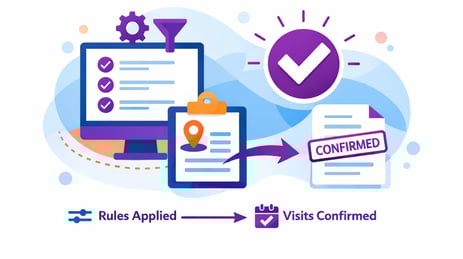
Automatically confirm visits based on configured rules, reducing manual effort and ensuring visits progress without delays.
Highlights:
-
Visits are automatically moved into confirmed status once submitted.
-
Auto-confirm rules are set at the Visit Type / Site level.
Where to Configure:
-
Admin > Visit Types > Auto-Confirm Visits (Tab)
More Details >>
Auto-Invite Participants

Nexus can now automatically send visit invitations to selected participant roles when a visit is confirmed or updated.
Highlights:
-
Invitations are sent automatically when a visit is confirmed.
-
Invitation updates are sent when confirmed visit details change.
-
Newly added participants receive invitations immediately.
-
Centralized, role-based configuration at the site level.
-
Eliminates “Not Sent” and “Update Required” invitation states.
Where to Configure:
-
Admin > Sites
Requester Permissions – Cancel / Reschedule Visits

Highlights:
-
Requesters can independently cancel visits when plans change.
-
Requesters can reschedule visits within allowed rules.
-
Reduces dependency on coordinators for common updates.
-
Maintains existing approval and visibility controls.
-
Visit Change log tracks and alerts when these changes are made.
Where to Configure:
-
Admin > Sites
Add from CRM – Customize Filters & Results

Users can more easily search, filter and identify CRM objects in the ‘Add from CRM’ function with these new display and filter controls. Administrators can fully control which search filters and results data are displayed,
Highlights:
-
Admins can activate filters for any mapped CRM Field in the 'Add from CRM' function.
-
Control which CRM fields appear as columns in the search results table.
-
Helps users better find and identify Accounts, Opportunities and Contacts for their visits.
Where to Configure:
-
Admin > Add from CRM Configuration
Add from CRM – Multi Organization Support
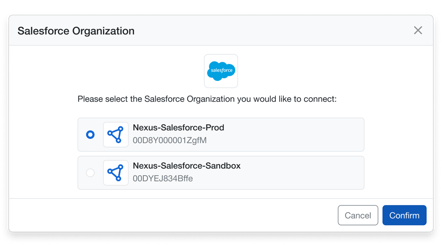
Support users who work across multiple CRM organizations. Allow users to add accounts, opportunities and contacts from multiple CRM orgs.
Highlights:
-
Users can connect to and switch between multiple CRM organizations.
-
Active CRM organization is clearly displayed during selection.
-
Organizations can be switched without leaving the visit workflow.
-
Prevents data pull from inactive or unapproved organizations.
Add from CRM – Set Valid Closed Opportunity Criteria
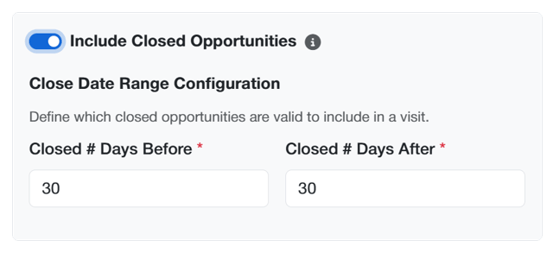
Improve opportunity relevance by controlling if and when closed opportunities can be added to a visit.
Highlights:
-
Admins set whether closed opportunities can be added to visits
-
If yes, Closed opportunities can be limited to a configurable recent timeframe.
-
Older closed opportunities are automatically excluded.
-
Ensures only valid opportunities are linked to visits
- More Details >>
“Add from CRM” Now Connects to Microsoft Dynamics

If you are a Microsoft Dynamics user, you can now leverage the ‘Add from CRM’ functionality in Nexus to retrieve accounts, opportunities and contacts directly from you CRM.
Highlights:
-
Enables Add from CRM for Microsoft Dynamics customers.
-
Supports Account, Contact, and Opportunity selection.
-
Provides consistent behavior with Salesforce integrations.
-
Applies the same validation and configuration controls.
-
Ensures feature parity across supported CRM platforms.
More Details >>
Visit-Level Survey Retrieval (Including Anonymous Responses)

Survey data API access has been expanded to provide a more complete view of engagement feedback. Integrations can now retrieve survey responses at the visit level, removing previous limitations that restricted access to attendee-linked responses only.
Highlights
-
Retrieve all survey responses associated with a visit, without requiring an attendee reference.
-
Anonymous survey submissions are fully supported and returned alongside attendee-linked responses.
-
Survey results are presented in a consistent format, making them easy to consume and analyze across integrations.
-
Existing attendee-level survey access remains unchanged, ensuring backward compatibility for current integrations.
Meeting Organizer Added to all Invitations by default
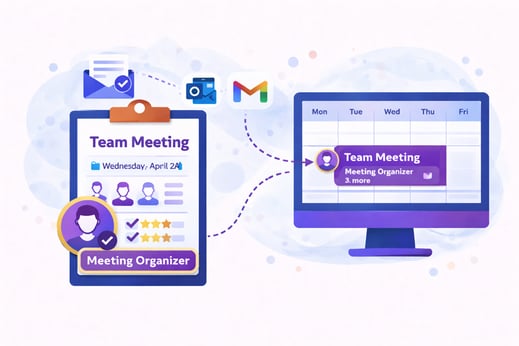
For programs leveraging the custom email domain feature, where emails and invitations are sent from an email alias within your email domain, the Meeting Organizer is now added to all invitations by default - ensuring that all invitations appear on that email alias’s calendar.
Highlights
-
Meeting organizers are now automatically included as recipients on all meeting notification emails.
-
Calendar invitations reliably appear on the organizer’s Outlook or Gmail calendar without requiring additional configuration or manual steps.
-
This enhancement removes dependency on previous calendar handling methods that caused inconsistent invite delivery.
More Details >>
Bug Fixes
Site Date & Time Settings
Fixed an issue where Date and Time settings configured at the site level were not retained after saving. Settings now persist correctly after updates.
Invitation Status Accuracy
Fixed issues where invitation statuses were not updating correctly after visit changes, ensuring participants always receive accurate notifications.
Opportunity Import Reliability
Resolved an issue that prevented certain Opportunities from being added from CRM due to data inconsistencies. Opportunities can now be added successfully without errors.
Additional Stability Improvements Across CRM Selection Flows
Resolved issues that could impact the stability and consistency of selecting CRM entities (Opportunities, Contacts, Attendees) during visit creation and updates, improving overall reliability of Add from CRM interactions.