
Setting "Lead Time" expectations for Request Forms is now available in Nexus.
The new feature allows Users to establish a predetermined number of days that will be
unavailable for selection as Briefing Date for the Engagement Request. To illustrate, suppose a
visit lead time is configured for 7 days; in such scenario requester submitting a request today will
see on the calendar that the closest 7 days, including current day, are blocked for selection
Visit Lead Time settings
The “Visit Lead Time settings” was added to the “Engagement Request” tab on the Settings –
Programs page. Additionally, the "Engagement Request" tab has been relocated to the bottom
of the list of Program tabs and rebranded as "Request Settings.
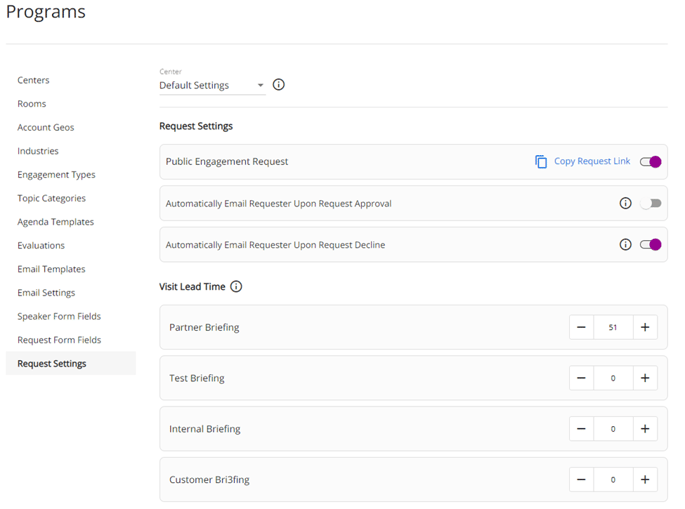
The User can update Visit Lead Time Settings for any Engagement Type of any Center they have access to. If the User has access to all Centers, they can select and update Default Settings. Only four standard Engagement Types are displayed for the Default Settings. Default Settings and its updates will apply to any center where the User did not change any settings manually. When the User updates any standard Engagement Types, this and all custom Engagement types related to it will be updated for any Center using Default Settings. For example, Center 1 with default setting has four standard Engagement Types and Custom Partner Engagement type assigned to it. When the User updates the number of days for the Partner Engagement Type on the Default Settings to 20, then number of days for the Partner Engagement type and Custom Partner Engagement Type in the Center 1 will be updated to 20. The User can restore Default Settings for any Center by clicking on “Restore Default” button that will be displayed to the right of Center Dropdown.
Number of days for each Engagement type can be set from 0 to 99. When a new Engagement type is selected for the Center, the number of days of relevant Engagement Type from the Default Settings will be applied to it. For example, if default number of days for the Internal Engagement type is 15, then when new custom Internal Engagement type will be added to any Center it will have 15 days selected by default.
When the number of days for any Engagement type of any Center is not 0, then the selected number of days will be blocked for selection for Requesters on the Calendar for any Request Form. For example, if the number of days for the Partner Engagement type of selected Center is 15, then when Requester clicks on the “Briefing Request Date” or “Alternative Briefing Request Date” they will see 15 days from today are blocked for selection. Additionally, the calendar will be opened in the month with the closest date available for selection instead of the current month.
When the User wants to update “Briefing Request Date” or “Alternative Briefing Request Date” field for already submitted Request, then User will need to select new date considering Visit Lead Time settings.