
Summary
The ‘Leadership’ menu item in CE Admi App allows the admin to provide leadership team members that will be shown in CE Client App(Figure 7.1). Once the admin clicks ‘Leadership’ menu item, the ‘Leadership’ page will be opened(Figure 7.2). The grid allows scrolling records, filtering them by the ‘Center’ dropdown, searching records by the names of leadership team members, deleting records. Clicking the column ‘Leadership name’ will open a page for editing record(Figure 7.3). On this page the admin could change ‘Leadership Name’, ‘Leadership Title’, ‘Leadership Bio’, ‘Leadership Photo’, ‘Center’.
In order to add a new leadership team member the admin should click the button ‘New Leadership Team Member’ at the top-right corner above the grid. After that a new page will be opened(Figure 7.4). The ‘Save’ button will be available after providing all mandatory fields.
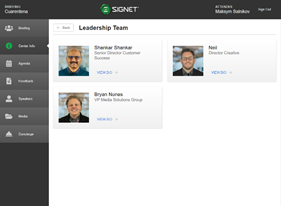
Figure 7.1 Leadership Tab
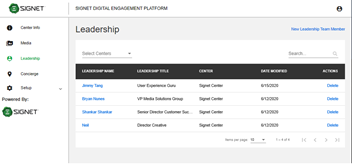
Figure 7.2: Leadership Edit Main View
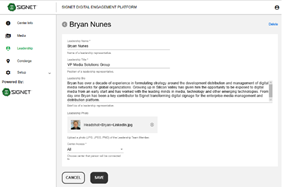
Figure 7.3: Editing existing leadership details
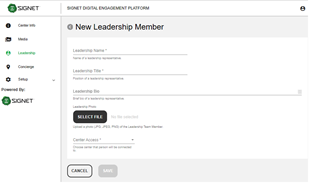
Figure 7.4: Creating a new leadership profile