
Functional Summary
Previously, confirmed visits could not be modified by Requesters or Visit Owners once confirmation was completed.
With this update:
-
Admins can explicitly decide whether Account Managers are allowed to:
-
Reschedule a confirmed visit
-
Cancel a confirmed visit
-
-
These actions apply only to visits in the “Confirmed” state
-
Permissions are managed centrally and enforced consistently across the platform
Key Capabilities
-
Admin-level control over visit change permissions
-
Support for both reschedule and cancel actions
-
Enforcement based on visit status
-
Clear visibility of allowed actions in the user interface
Requester Permissions – Overview
Requester permissions determine whether an Account Manager can modify a visit after it has been confirmed.
Who Controls These Permissions?
-
Platform Admins
Who Uses These Permissions?
-
Visit Owners
What Do They Apply To?
-
Visits that are in Confirmed status
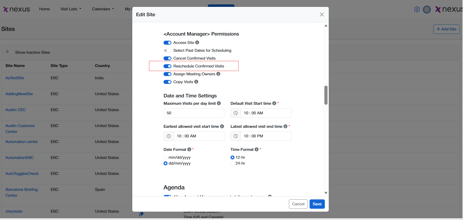
Rescheduling Visits – How It Works
When reschedule permissions are enabled:
-
The Visit Owner can reschedule a visit that is already confirmed
-
The option to reschedule appears only when:
-
The visit status is Confirmed
-
The Admin has enabled reschedule permission
-
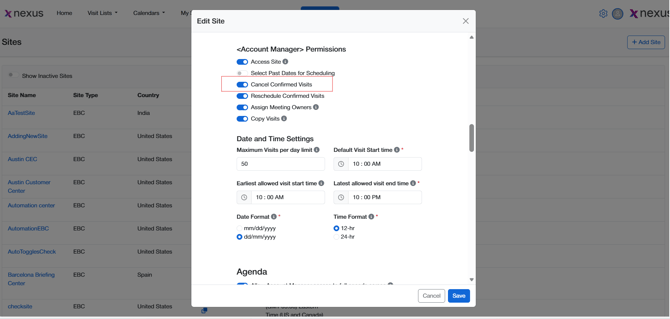
Cancelling Visits – How It Works
When cancel permissions are enabled:
-
The Visit Owner can cancel a confirmed visit
-
The cancel option is visible only when:
-
The visit status is Confirmed
-
the Admin has granted cancel permissions
-
Permission Rules & Conditions
|
Condition |
Behavior |
|---|---|
|
Visit status is Confirmed |
Reschedule / Cancel options may be available |
|
Visit status is not Confirmed |
This feature does not apply |
|
Admin permission enabled |
Visit Owner can perform the action |
|
Admin permission disabled |
Visit Owner cannot perform the action |
User Flow – Step-by-Step
For Admins
-
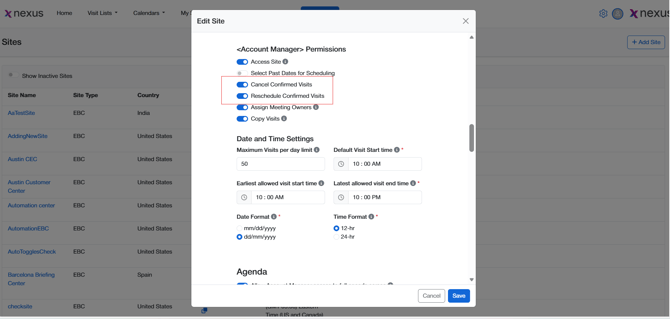
Configure permissions that allow or restrict Requesters from modifying confirmed visits
-
Setting>Site>Edit Site>Account Manager Permissions
-
Save changes to apply them platform-wide
For Account Managers (Requesters) and Visit Owners
-
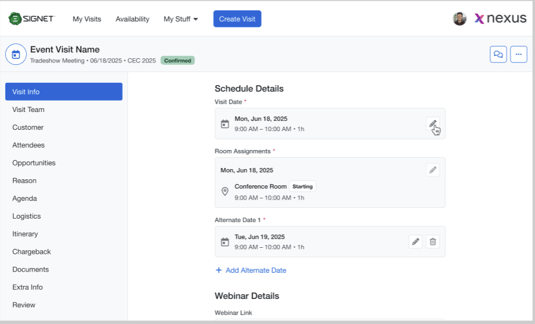
Open a visit that is in Confirmed status
-
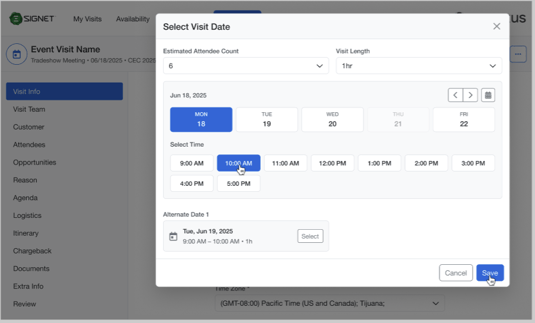
Click on Edit ‘Visit Date’
-
Select Reschedule date or Cancel (if permitted)
-
Click ‘Save’ and Complete the action
-
Send ‘Reschedule’ or ‘Cancel’ Visit Email
-
Visit will be ‘Rescheduled’ or ‘Canceled’
FAQs
Who can reschedule or cancel a confirmed visit?
Only Account Managers and visit owners who have been granted permission by an Admin.
Does this apply to all visit statuses?
No. This applies only to visits in Confirmed status.
Can Admins revoke this access later?
Yes. Permissions can be enabled or revoked by Admins at any time.
Are there any additional approval steps?
No additional approvals are defined as part of this feature.