
Overview
The MS Dynamics Integration Updates – New Engagement Form Fields feature introduces new Account, Opportunity, and Contact-level fields into the Microsoft Dynamics → BriefingEdge mapping interface. These updates provide CRM and Integration teams with greater control over field alignment, more accurate data synchronization, and a seamless handoff when users initiate engagement requests from Dynamics.
This enhancement ensures:
-
A consistent and automated data transfer from Dynamics to BriefingEdge
-
Expanded mapping options for newly added engagement fields
-
A streamlined end-to-end workflow from CRM user action to engagement creation
-
Real-time synchronization for mapped Account, Opportunity, and Contact details
Table of Contents
- Overview
- Functional Summary
- Key Capabilities
- Benefits
- Mapping Configuration
- 3.1 How to Configure Mapping
- New Engagement Fields & Mapping Reference
- Field List
- Field Behavior & Logic
- 5.1 Auto-Population Behavior
- 5.2 Real-Time Sync
- End-to-End Workflow (Dynamics → BriefingEdge)
- Step-by-Step Flow
- Data Synchronization Details
- Sync Frequency
- FAQs
- Support & Maintenance
Functional Summary
Key Capabilities
-
New Dynamics fields are now available within the Mapping Configuration section:
-
Parent Account Name
-
Parent Account ID
-
Organization ID
-
Partner ID
-
Annual Revenue
-
Contact Type
-
Business Group
-
Business Unit
-
Level 1 - Business Group
-
Level 2 - Business Unit
-
Opportunity Segment
-
Opportunity Priority
-
-
Admins can map any Dynamics field → BriefingEdge field through a dropdown interface.
-
Engagement creation via Request an Engagement now auto-populates BriefingEdge fields using the administrator-defined mappings.
-
All mapped fields synchronize in real time between Dynamics and BriefingEdge.
Benefits
-
Reduced manual entry for CRM users
-
Standardized data quality across CRM and BriefingEdge
-
Improved reporting consistency
-
Fast engagement creation with pre-populated data
Mapping Configuration
The Dynamics → BriefingEdge Field Mapping Interface now exposes all new engagement fields under the Account, Opportunity, and Contact categories.
1 How to Configure Mapping
-
Navigate to:
MS Dynamics Admin → Integrations → Field Mapping -
Expand the relevant section:
-
Account Fields
-
Opportunity Fields
-
Contact Fields
-
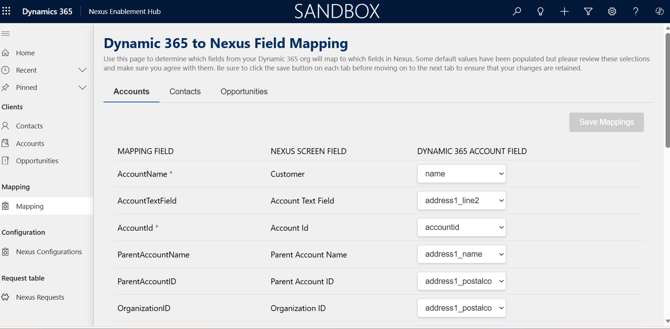
-
Locate the new mapping rows added for Q4 2025.
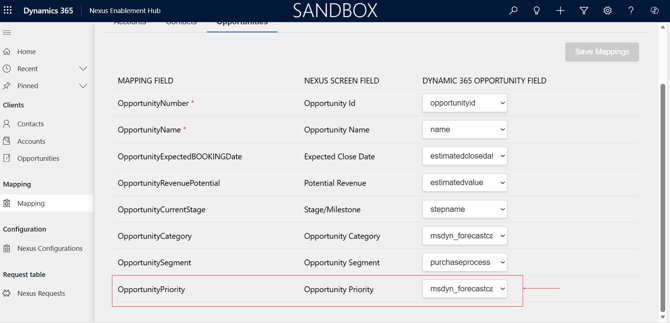
-
From each row, choose:
-
Dynamics Field (Left Column) – Dynamics Field Name
-
BriefingEdge Field (Right Column) – target field to populate
-
Dynamic 365 Field Field (Right Column) – selectable from a dropdown of available CRM attributes
-
-
Click Save Mapping.
-
Changes take effect immediately for all new engagement requests submitted from Dynamics.
New Engagement Fields & Mapping Reference
Field List
|
Dynamics Category |
New Field Name |
BriefingEdge Destination Field |
Notes |
|---|---|---|---|
|
Account |
Parent Account Name |
Parent Account |
Auto-syncs when Account is selected |
|
Account |
Parent Account ID |
Parent Account ID |
Unique Identifier |
|
Account |
Organization ID |
Organization ID |
Used for unique cross-system linking |
|
Account |
Partner ID |
Partner ID |
Unique Identifier |
|
Account |
Annual Revenue |
Annual Revenue |
Supports currency formats |
|
Contact |
Contact Type |
Contact Type |
Dropdown in BE; maps to text/value pair |
|
Contact |
Business Group |
Business Group |
Syncs to BE visitor profile |
|
Contact |
Business Unit |
Business Unit |
Typically department / org layer |
|
Contact |
Level 1 - Business Group |
Level 1 |
Sub-hierarchy / function layer |
|
Contact |
Level 2 - Business Unit |
Level 2 |
Sub-hierarchy / Department layer |
|
Opportunity |
Opportunity Segment |
Opportunity Segment |
Classifies the opportunity into a segment (e.g., Strategic, Commercial, Enterprise, SMB). |
|
Opportunity |
Opportunity Priority |
Opportunity Priority |
Indicates the priority level (e.g., High, Medium, Low) for scheduling and resource planning. |
Field Behavior & Logic
1 Auto-Population Behavior
When a CRM user selects a Account + Opportunity + Contact and triggers Request an Engagement:
-
BriefingEdge receives the mapped fields instantly.
-
The Engagement Form in BriefingEdge displays all mapped field values pre-filled.
-
Users may edit values in BriefingEdge.
5.2 Real-Time Sync
-
Account, Opportunity, and Contact data are refreshed in BriefingEdge via Dynamics API pulls.
-
Only mapped fields participate in the automatic data population.
End-to-End Workflow (Dynamics → BriefingEdge)
Step-by-Step Flow
-
CRM User selects an Account
-
Dynamics loads Account details including Parent Account, Annual Revenue, Organization ID.
-
-
User selects related Opportunity
-
Opportunity fields (existing + newly mapped ones) become available.
-
-
User selects Contact
-
Contact Type, Business Group, Level 1/2 pulled from CRM contact record.
-
-
User clicks “Request an Engagement”
-
Dynamics packages all mapped fields into a payload.
-
The user is redirected to BriefingEdge.
-
-
BriefingEdge Engagement Form loads with auto-populated fields
-
Mapped fields apply instantly.
-
Users can adjust values if needed based on permissions.
-
-
Engagement created in BriefingEdge
-
Linked back to the Dynamics Account/Opportunity/Contact.
-
Data Synchronization Details
Sync Frequency
-
Mapping application is real-time at point of engagement creation.
-
Ongoing data sync processes (Accounts, Opportunities, Contacts) follow the standard Dynamics integration cycle.
FAQs
"Do we need to re-map existing fields?"
No. Existing mappings remain intact. Only the new fields require mapping.
"Does the integration support custom Dynamics fields?"
Yes. Any custom Account, Opportunity, or Contact attributes available in the Dynamics API can be mapped.
"Can BriefingEdge overwrite Dynamics data?"
No. The sync is one-way: Dynamics → BriefingEdge.
9. Support & Maintenance
For CRM Admins
-
Review mappings quarterly or after Dynamics schema changes.
-
Ensure custom fields appear in the Dynamics API and user permissions allow retrieval.
For Event Coordinators
-
Expect fully populated Engagement Forms when requests come from Dynamics.
-
Report missing or incorrect field values to your CRM Admin for mapping verification.
-
New Account-level fields such as Parent Account Name, Organization ID, and Annual Revenue.
-
New Opportunity and Contact fields, including new picklists and hierarchical levels.
-
Compatibility with Report Builder, enabling filtering, grouping, and export.
-
Full availability via the V3 API endpoint to power automation and system integrations.