
Overview
This release introduces a suite of new standardized fields across Accounts, Opportunities, and Contacts within engagements. These updates improve:
-
Data completeness for customer and partner engagements
-
Consistency between CRM systems and platform forms
-
Downstream reporting and segmentation
-
Alignment with enterprise data models
These fields are fully configurable, integrated with CRM systems, and accessible across the platform for operational, planning, and analytics workflows.
Table of Contents
What’s New
-
New Account-level fields such as Parent Account Name, Organization ID, and Annual Revenue.
-
New Opportunity and Contact fields, including new picklists and hierarchical levels.
-
Complete integration support for Salesforce and Microsoft Dynamics.
-
Compatibility with Report Builder, enabling filtering, grouping, and export.
-
Full availability via the V3 API endpoint to power automation and system integrations.
New Fields by Category
Account Fields
|
Field Name |
Type |
Description |
|---|---|---|
|
Parent Account Name |
Text |
Captures the immediate parent or umbrella organization. |
|
Parent Account ID |
Text |
Captures the immediate parent or umbrella organization account ID. |
|
Organization ID |
Text |
Unique identifier used for CRM synchronization. |
|
Partner ID |
Text |
Captures the Partner ID |
|
Annual Revenue |
Numeric |
Annual revenue value used for segmentation and reporting. |
Opportunity Fields
|
Field Name |
Type |
Description |
|---|---|---|
|
Opportunity Segment |
Picklist |
Classifies the opportunity into a segment (e.g., Strategic, Commercial, Enterprise, SMB). |
|
Opportunity Priority |
Picklist |
Indicates the priority level (e.g., High, Medium, Low) for scheduling and resource planning. |
Contact Fields
|
Field Name |
Type |
Description |
|---|---|---|
|
Contact Type |
Picklist |
Defines stakeholder type (e.g., Decision Maker, Influencer, Partner). |
|
Business Group |
Text |
Internal business group aligned with the contact’s organizational role. |
|
Business Unit |
Text |
Internal or customer-facing business unit the contact is associated with. |
|
Level 1 - Business Group |
Text |
First-tier hierarchical classification (e.g., Region, Division). |
|
Level 2 - Business Unit |
Text |
Second-tier hierarchical classification providing detailed segmentation. |
Configuration & Administration
Platform Admins can configure all new fields through Admin Settings → Request Form Setup.
Admins can:
-
Enable or disable specific fields for visibility on Account, Opportunity, or Contact forms
-
Configure picklist values for new dropdown fields
-
Set field-level requirements such as mandatory, optional, or conditional
-
Map fields to CRM objects for bi-directional sync
-
Control field behavior for user roles (e.g., Admin-only fields)
Step-by-Step: How to Configure New Fields
Below is a step-by-step guide for Admins who need to configure field visibility, requirements, and CRM mappings.
1. Navigate to Request Form Setup
-
Go to Admin Settings
-
Select Request Form Setup
-
Open the Accounts, Opportunities, or Contacts tab depending on the field you want to configure.
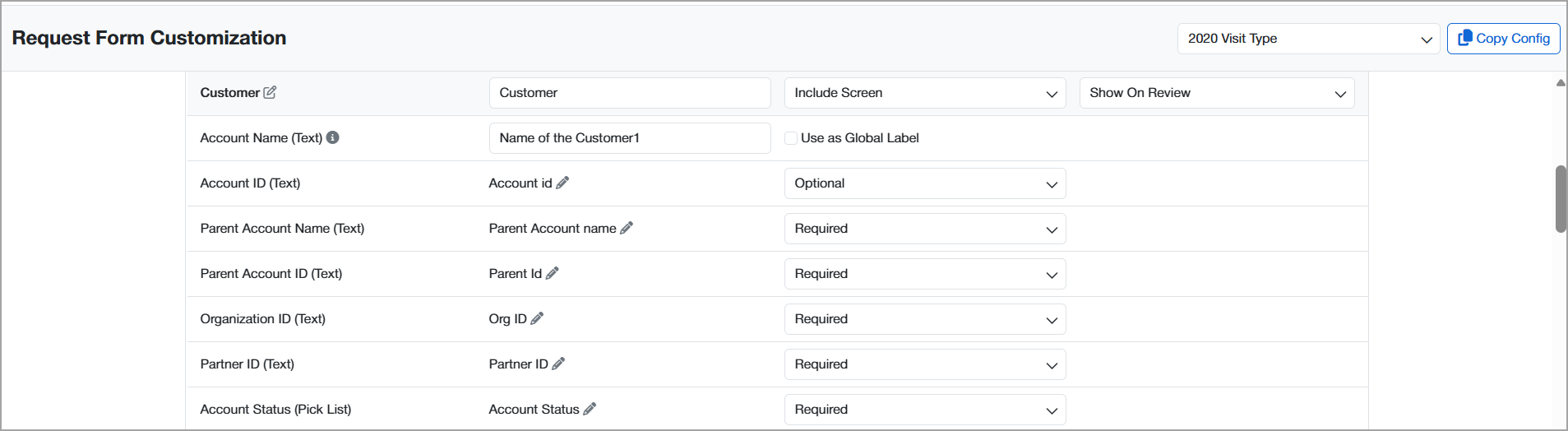
2. Enable or Disable a Section
-
Locate the relevant section.
-
Select Include / Exclude/Hidden from Account Manager to control whether the field appears on user-facing forms.
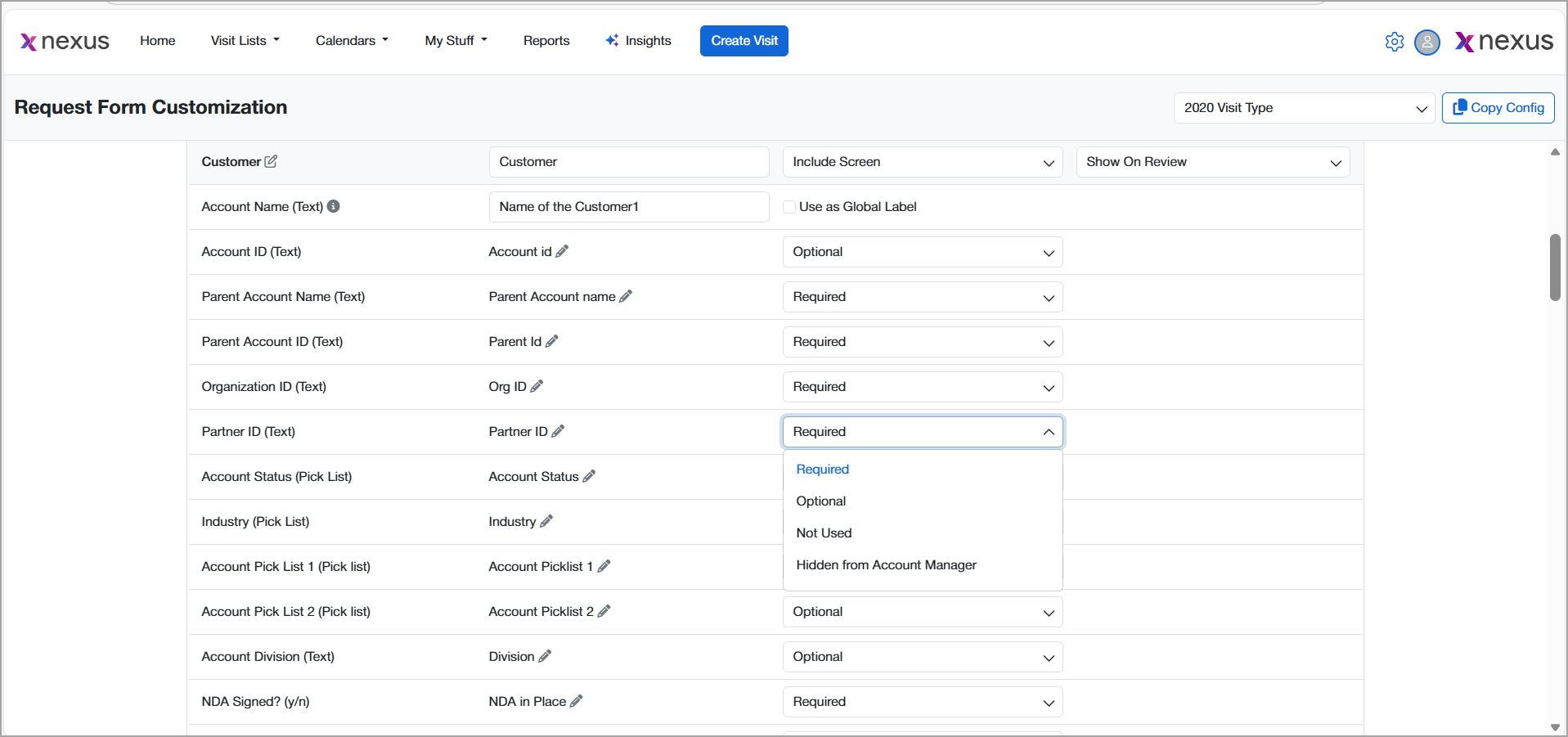
3. Set Field Requirements
-
Open the field configuration drawer.
-
Select one of the following:
-
Required – Field must be provided before submission
-
Optional – Visible but not mandatory
-
Not Used– Becomes Hidden
-
Hidden from Account Manager - gets hidden from Account Managers
-
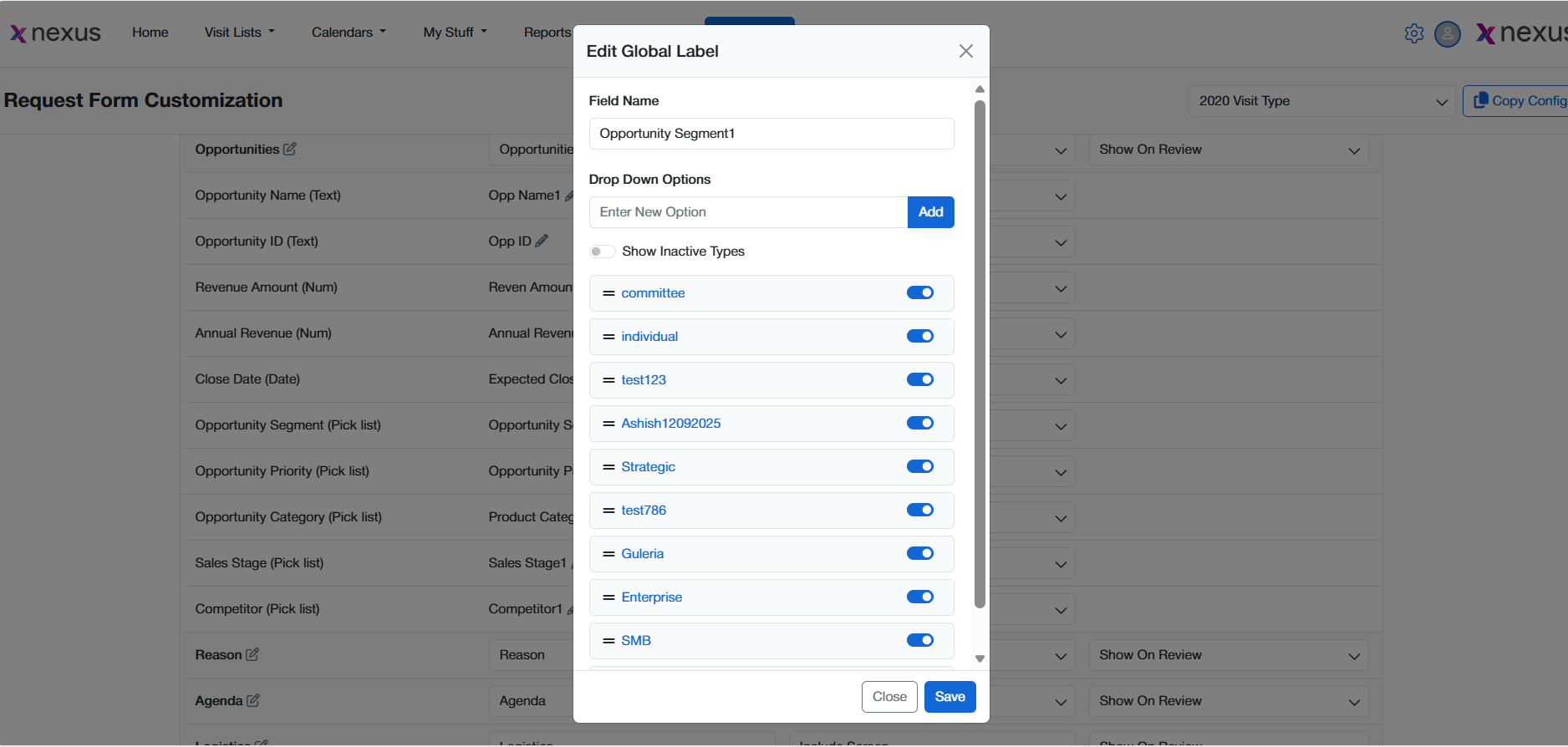
4. Configure Picklist Values (for dropdown fields)
-
Select the picklist field (e.g., Opportunity Segment).
-
Add, edit, or remove values.
-
Set a default picklist value.
5. Publish Changes
-
After completing configuration
-
Changes take effect immediately and appear on all new engagements.
CRM Integration
The new fields fully support integration with both:
-
Salesforce CRM
-
Microsoft Dynamics CRM
Integration Behavior Details
Supported Actions
-
Bi-directional field syncing (where configured)
-
Real-time data validation and push
-
Error-handling logs available in the Integration Monitor
Mapping Guidance
-
Map Account fields to CRM Account objects
-
Map Opportunity fields to Opportunity/Sales entities
-
Map Contact fields to CRM Contact records
-
Use Organization ID as a unique identifier where possible
Report Builder Availability
All new fields are now available as dimensions and filters in Report Builder.
Users can:
-
Filter engagements by Business Group, Contact Type, Level 1/2
-
Build Account-level segmentation using Parent Account or Annual Revenue
-
Create a summary in pie chart or digractaical reesentation
This ensures that analytics teams can run deeper insights on customer types, organizational hierarchies, and opportunity structures.
API Access
The new fields are accessible via the V3 API endpoint.
Included in V3:
-
Read and write support for all new Account, Opportunity, and Contact fields
-
Standardized field keys for consistent integration logic
-
API documentation updated with schema and examples
Use cases:
-
Syncing data from external CRMs
-
Building automated workflows for engagement creation
-
Bulk data ingestion for enterprise reporting
FAQs
"Who can see the new fields?"
Visibility depends on Admin configuration and user role settings.
Admins can make fields visible to Account Manages/Requestors or restrict access to Admin-only.
"Do these fields replace any existing ones?"
No existing fields are being removed. However, Admins should migrate from custom fields to these standardized options where applicable.
"Can I update these fields during an active engagement?"
Yes, as long as the engagement status and user permissions allow editing.