
- Featured Enhancements
- 1. Enhanced Topic Profiles
- 2. Enhanced Speaker Profiles & Management
- 3. Add Links to Request Form Fields & Helper Text
- 4. Rich Text Formatting Enabled in Request Form
- 5. Conditional Field Logic
- 6. Off-Site Visit Location Updates
- 7. 'Reason for Visit' Moved Up in Request Form
- 8. External Survey Results Integration
- 9. Requester Permissions and Meals Options
- Bug Fixes
- Report Filters – Multi-Select Selection Behavior
- Improved Visibility for Long Dropdown and Visit Type Names
- Review Screen Field Label Display
- Global Settings Numeric Field Saving
- Copy Visit Date Selection
- Room Auto-Assignments Visit Type Visibility
- “My Scores” Setting Persistence for Presenter Role
Featured Enhancements
This release introduces major enhancements to Agenda Topic & Speaker Management, new request form field if → then display logic, along with several usability and stability improvements across reporting, settings, visit copy, and room assignment workflows.
1. Enhanced Topic Profiles
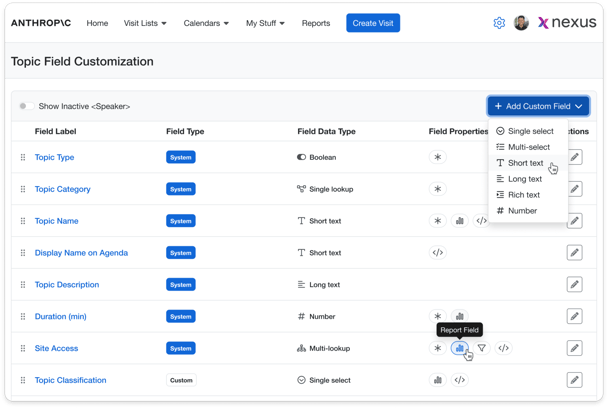
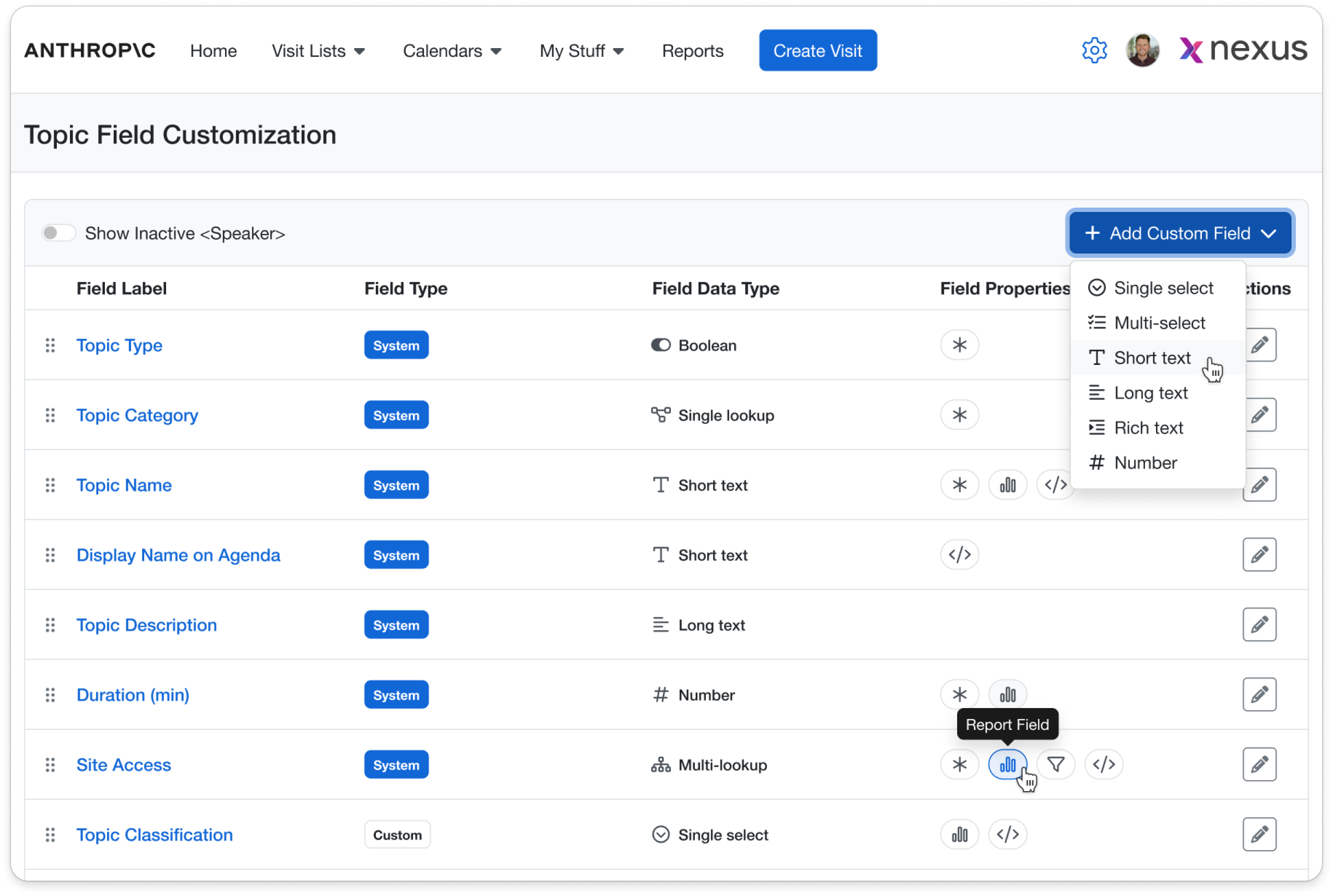
Add new topic classifications to improve search and reporting - or attach a gold-standard deck to each topic and automatically share it with speakers when they’re invited to present. All of this is now possible with the new Dynamic Topic Field enhancements.
Highlights:
-
Admins can manage standard and custom topic fields from the Agenda Topic Field Customization screen.
-
Set which topic fields are used as filters, in reports, and in email templates.
-
New ‘Display Name on Agenda’ field allows you to define a default customer-facing name for any Topic in your catalog.
-
Topic catalogs now include improved search and filtration.
Learn More>>
2. Enhanced Speaker Profiles & Management
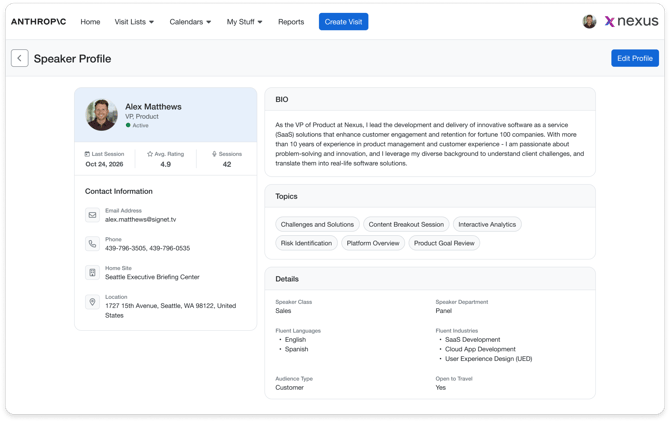
Create new fields to better classify and find speakers, expose the speaker database to more members of your team, and view speaker details in a now holistic profile view.
Highlights:
-
Admins can configure standard and custom speaker fields in one centralized area.
-
Speaker Administration now includes search, dynamic filters, and configurable columns.
-
Newly added speaker overview screen for single view speaker information
-
New global settings controls which access levels can view speaker management screen.
-
Speaker fields can be used in reports and speaker invitation templates when enabled.
Learn More>>
3. Add Links to Request Form Fields & Helper Text
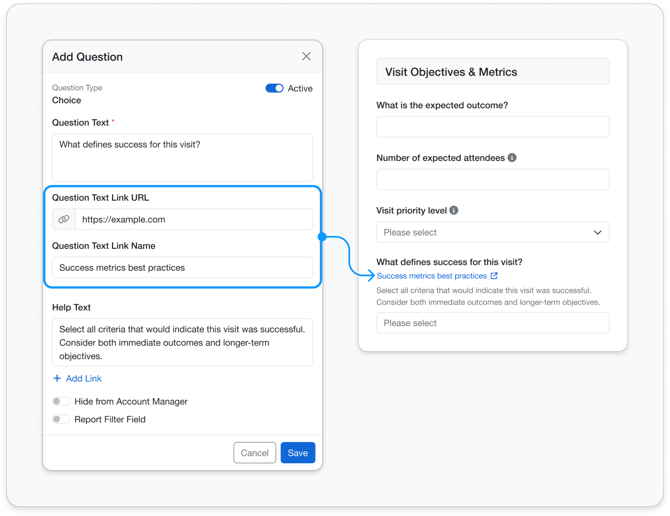
This feature enables admins to enhance request forms by adding clickable links directly within Question Text and Help Text. It allows users to access relevant resources and guidance without leaving the form. The result is a more intuitive and informative form experience that improves completion accuracy.
Highlights
-
Add clickable links to Question Text and Help Text fields
-
Customize links with a display name or show as a URL
-
Edit or update links anytime with immediate reflection across forms
-
Support for multi-line text to provide clearer instructions
-
Help Text displayed directly below fields for better usability
Learn More>>
4. Rich Text Formatting Enabled in Request Form
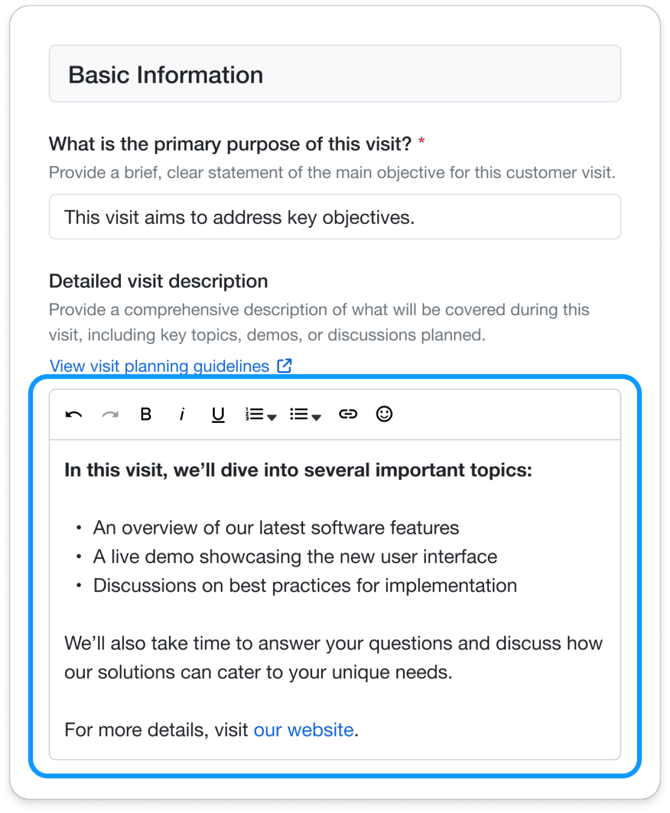
Highlights
-
Enable rich text formatting (bold, italics, underline, lists, spacing, emoticons)
-
Improve readability and structure of user responses
-
Formatting preserved across Review, Summary View, reports, and exports
-
Supports better communication and higher-quality data capture
Learn More>>
5. Conditional Field Logic
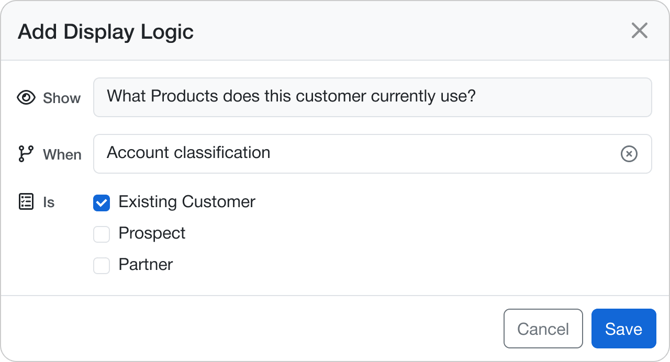
Admins can now configure request form fields to appear based on user selections, keeping forms cleaner and more focused.
Highlights:
-
Display logic can be configured directly from the form layout using the Branch icon.
-
Dependent fields remain hidden until the configured trigger condition is met.
-
Choice and Multi-Choice fields can be used as trigger fields.
-
Existing logic can be reopened and updated without recreating the field.
-
Logic is also respected on supported external forms when the related fields are enabled there.
Learn More>>
6. Off-Site Visit Location Updates
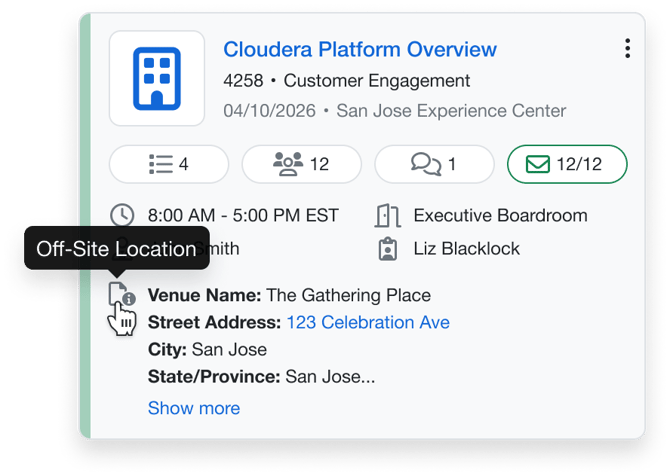
Off-site location details are now easier to access across the application, with location previews shown directly on Visit Cards and full details available without opening the visit.
Internal Documentation Link: Off-Site Visit Location Updates
Highlights:
-
Off-Site Visit Location is displayed directly on Visit Cards.
-
A Show More link opens the full location details in a popup.
-
Truncated previews preserve formatting and show the first portion of the location content.
-
Off-Site Location is also available in list views, reports, and invitation templates.
-
Location visibility appears only when the Off-site location is provided for any visit type.
7. 'Reason for Visit' Moved Up in Request Form
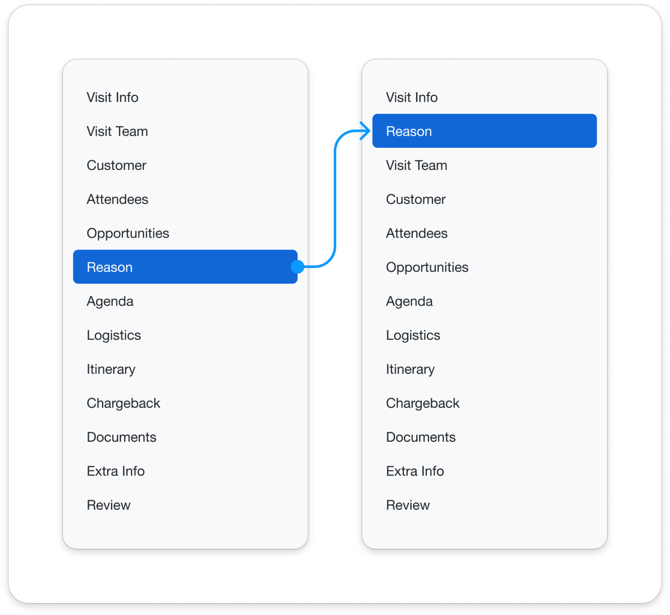
The Engagement Objectives (Reason for Visit) section now appears immediately after Visit Info across all visit workflows, so requestors capture the 'why' earlier in the process.
Highlights:
-
Engagement Objectives is now positioned directly after Visit Info.
-
The updated order is applied across Request Form Setup, Create/Edit, Review, Summary, Export, and Reports.
-
No layout, validation, or functionality changes were introduced; only the sequence was updated.
-
Admins retain control over whether the section is included or hidden by role.
-
The updated order is reflected consistently across downstream outputs.
Learn More>>
8. External Survey Results Integration
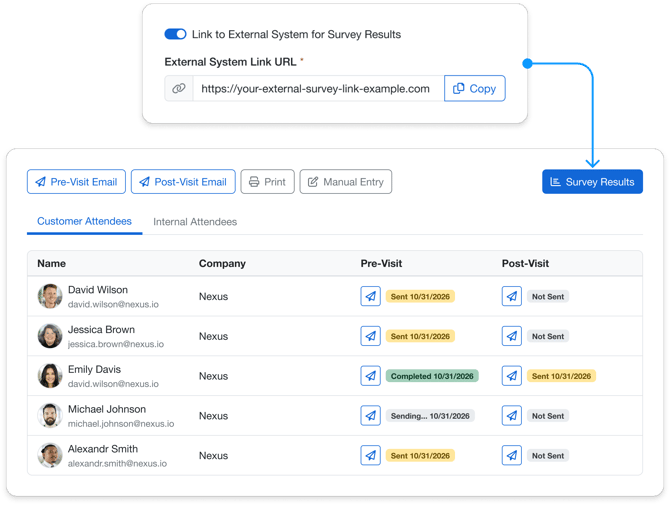
Admins can now redirect survey result actions to an external survey system, allowing users to open survey results in a new browser tab while staying within their current visit workflow.
Highlights:
-
A global toggle can enable or disable external survey redirection.
-
Admins can configure a centralized external survey URL for survey results.
-
Survey Results access points across the Engagement Hub can redirect users to the external link.
-
The external survey opens in a new browser tab so the current workflow is not interrupted.
-
If the feature is disabled, the system continues to use the existing internal survey behavior.
Learn More>>
9. Requester Permissions and Meals Options
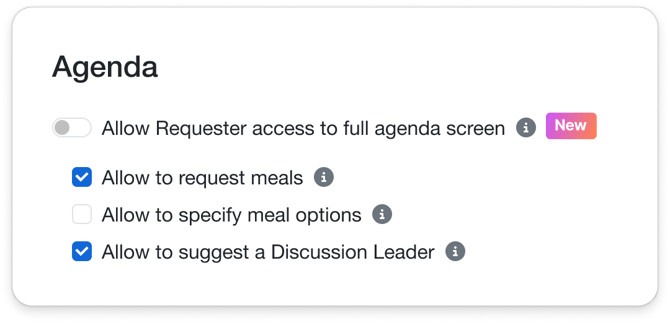
Admins can now manage requester agenda access at the site level and allow requesters to add meals, suggest speakers during agenda planning - giving teams more control over how requesters participate in the agenda workflow.
Highlights:
-
New Agenda configuration section is available at the Site level.
-
Admins can control whether requesters have full agenda access or limited access to selected capabilities.
-
Requesters can add meals from the agenda catalog when meal requests are enabled.
-
Meal options can be enabled when meal requests are turned on.
-
Requesters can also assign suggested speakers to agenda items when permissions are enabled.
-
Relevant agenda permission settings have moved from Global Settings to Site-level configuration.
Learn More>>
Bug Fixes
Report Filters – Multi-Select Selection Behavior
Resolved an issue where multi-select filters in the report builder collapsed after each selection, making it difficult to choose multiple values in one pass.
Improved Visibility for Long Dropdown and Visit Type Names
Resolved a usability issue where dropdown values could appear too narrow to read comfortably. Long visit type names are now easier to identify without guessing.
Review Screen Field Label Display
Resolved an issue where certain customer field labels displayed incorrectly in the Review screen, including an unintended character prefix that was not shown in the Customer screen.
Global Settings Numeric Field Saving
Fixed an issue where numeric values in Global Settings did not persist after being updated, even though other settings on the page saved as expected.
Copy Visit Date Selection
Fixed an issue that could prevent users from selecting a date when copying a visit if the original visit did not have a host briefer, avoiding an undefined popup during the process.
Room Auto-Assignments Visit Type Visibility
Resolved an issue where visit type names in Room Auto-Assignments could be truncated without any hover text, making rows harder to identify.
“My Scores” Setting Persistence for Presenter Role
Fixed an issue where deselecting the “My Scores” setting for the Presenter role did not persist after refresh. The setting now follows the saved configuration correctly.
CRM Management Access Restrictions
Updated access to selected CRM management settings so only BES Admin users can manage these configuration areas, reducing the risk of mapping errors caused by unintended customer-side changes.
New Opportunity Modal Dropdown Display
Resolved a visual issue in the New Opportunity modal where a date value could overlap expanded dropdown menus, making the available options harder to review and select.